 |
 | |FP16/INT8 ||
 |
Simple kernel implementing a version of yAx, to demonstrate the downside of allocating a large amount of LDS, and the benefit of using a smaller amount of LDS due to occupancy limits.
Note: This exercise was tested on a system with MI210s, on omniperf version2.0.0 and ROCm 6.0.2 Omniperf 2.0.0 is incompatible with ROCm versions lesser than 6.0.0
      <li><strong>FP(32/16):</strong> 32- or 16-bit Floating Point numeric types</li>
      <li><strong>FLOPs:</strong> Floating Point Operations Per second</li>
      <li><strong>HBM:</strong> High Bandwidth Memory is globally accessible from the GPU, and is a level of memory above the L2 cache</li>
</ul>In this exercise we’re using a problem code that is slightly different than where we left off in Exercise 1. Regardless, to get started we need to get a roofline by running:
omniperf profile -n problem_roof_only --roof-only --kernel-names -- ./problem.exeThe plots will appear as PDF files in the ./workloads/problem_roof_only/MI200 directory, if generated on MI200 hardware.
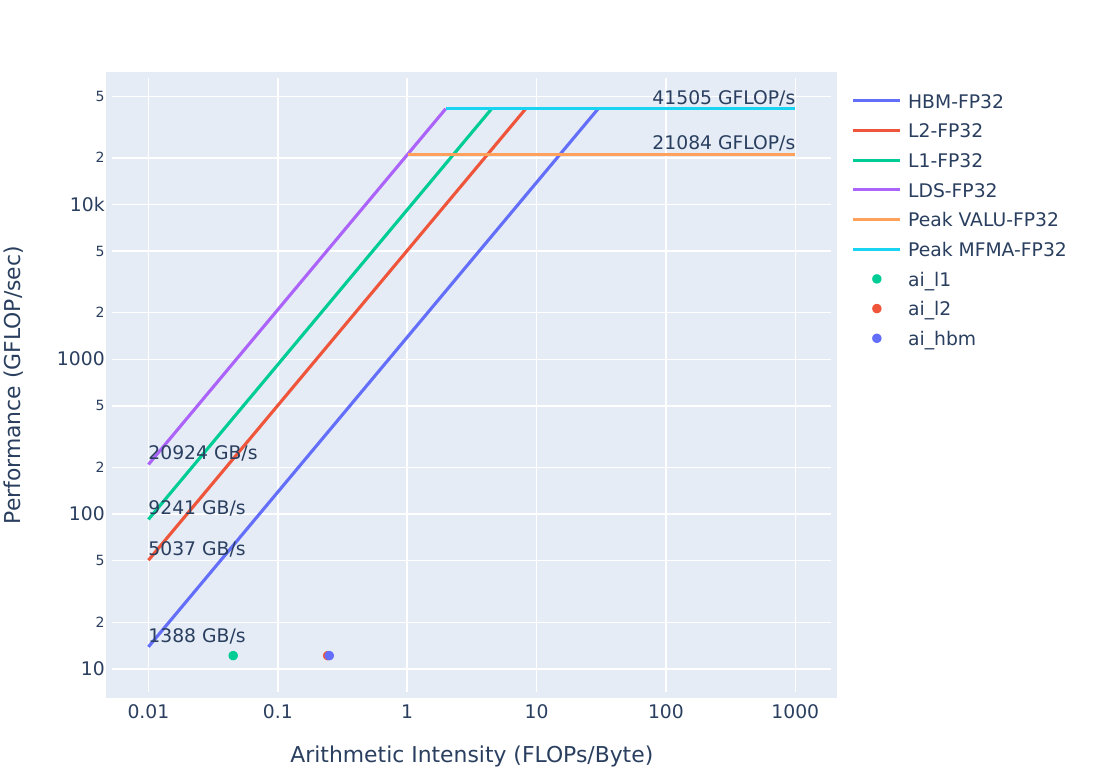
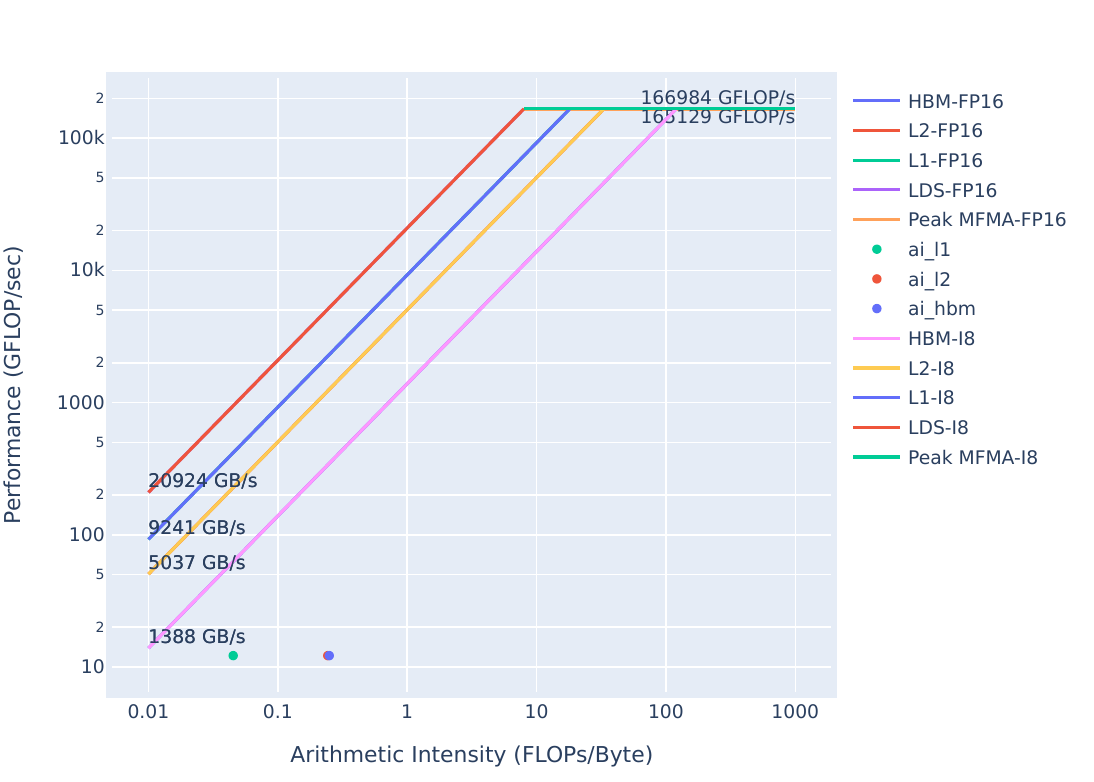
For convenience, the resulting plots on a representative system are below: | Roofline Type | Roofline Legend | Roofline Plot | |—————|—————————————————-|——————————————————| |FP32/FP64 || | |FP16/INT8 || |
We see that there looks to be room for improvement here. We’ll use omniperf to see what the current limiters are.
First, we should get an idea of the code’s runtime:
make
./problem.exe(simulated output)
yAx time: 140 msThis problem.cpp uses LDS allocations to move the x vector closer to the compute resources, a common optimization. However, we see that it ends up slower than the previous solution that didn’t use LDS at all. In kernels that request a lot of LDS, it is common to see that the LDS usage limits the occupancy of the kernel. That is, more wavefronts cannot be resident on the device, because all of them need more LDS than is available. We need to confirm this hypothesis, let’s start by running:
omniperf profile -n problem --no-roof -- ./problem.exeThe usage of omniperf profile arguments can be found here, or by running omniperf profile --help.
This omniperf profile command will take a minute or two to run, as omniperf must run your code a few times to collect all the hardware counters.
Note: For large scientific codes, it can be useful to profile a small representative workload if possible, as profiling a full run may take prohibitively long.
Once the profiling run completes, let’s take a look at the occupancy stats related to LDS allocations:
omniperf analyze -p workloads/problem/MI200 --dispatch 1 --block 2.1.15 6.2.7The metrics we’re looking at are: - 2.1.15 Wavefront occupancy – a measure of how many wavefronts, on average, are active on the device - 6.2.7 SPI: Insufficient CU LDS – indicates whether wavefronts are not able to be scheduled due to insufficient LDS
The SPI section (6.2) generally shows what resources limit occupancy, while Wavefront occupancy (2.1.15) shows how severely occupancy is limited in general. As of Omniperf version 2.0.0, the SPI ‘insufficient’ fields are a percentage showing how frequently a given resource prevented the SPI from scheduling a wavefront. If more than one field is nonzero, the relative magnitude of the nonzero fields correspond to the relative severity of the corresponding occupancy limitation (a larger percentage means a resource limits occupancy more than another resource with a smaller percentage), but it is usually impossible to closely correlate the SPI ‘insufficient’ percentage with the overall occupancy limit. This could mean you reduce a large percentage in an ‘insufficient’ resource field to zero, and see overall occupancy only increase by a comparatively small amount.
The output of the omniperf analyze command should look similar to this:
  ___                  _                  __
 / _ \ _ __ ___  _ __ (_)_ __   ___ _ __ / _|
| | | | '_ ` _ \| '_ \| | '_ \ / _ \ '__| |_
| |_| | | | | | | | | | | |_) |  __/ |  |  _|
 \___/|_| |_| |_|_| |_|_| .__/ \___|_|  |_|
                        |_|

Analysis mode = cli
[analysis] deriving Omniperf metrics...

--------------------------------------------------------------------------------
0. Top Stats
0.1 Top Kernels
-----------------------------------------------------------------------------------------------------------------
|    | Kernel_Name                              |   Count |      Sum(ns) |     Mean(ns) |   Median(ns) |    Pct |
-----|------------------------------------------|---------|--------------|--------------|--------------|---------
|  0 | yax(double*, double*, double*, int, int, |    1.00 | 176224652.00 | 176224652.00 | 176224652.00 | 100.00 |
|    |  double*) [clone .kd]                    |         |              |              |              |        |
-----------------------------------------------------------------------------------------------------------------
0.2 Dispatch List
-------------------------------------------------------------------------------------------------
|    |   Dispatch_ID | Kernel_Name                                                   |   GPU_ID |
-----|---------------|---------------------------------------------------------------|-----------
|  0 |             1 | yax(double*, double*, double*, int, int, double*) [clone .kd] |        8 |
-------------------------------------------------------------------------------------------------


--------------------------------------------------------------------------------
2. System Speed-of-Light
2.1 Speed-of-Light
-------------------------------------------------------------------------------------
| Metric_ID   | Metric              |    Avg | Unit       |    Peak |   Pct of Peak |
--------------|---------------------|--------|------------|---------|----------------
| 2.1.15      | Wavefront Occupancy | 103.00 | Wavefronts | 3328.00 |          3.10 |
-------------------------------------------------------------------------------------


--------------------------------------------------------------------------------
6. Workgroup Manager (SPI)
6.2 Workgroup Manager - Resource Allocation
----------------------------------------------------------------------
| Metric_ID   | Metric              |   Avg |   Min |   Max | Unit   |
--------------|---------------------|-------|-------|-------|---------
| 6.2.7       | Insufficient CU LDS | 79.01 | 79.01 | 79.01 | Pct    |
----------------------------------------------------------------------
Looking through this data we see: - Wavefront occupancy (2.1.15) is 3%, which is very low - Insufficient CU LDS (6.2.7) contains a fairly large percentage, which indicates our occupancy is currently limited by LDS allocations.
There are two solution directories, which correspond to two ways that this occupancy limit can be addressed. First, we have solution-no-lds, which completely removes the LDS usage. Let’s build and run this solution:
cd solution-no-lds
make
./solution.exe(simulated output)
yAx time: 70 msWe see that the runtime is much better for this solution than the problem, let’s see if removing LDS did indeed increase occupancy:
omniperf profile -n solution --no-roof -- ./solution.exe(output omitted)
Once the profile command completes, run:
omniperf analyze -p workloads/solution/MI200 --dispatch 1 --block 2.1.15 6.2.7The output should look something like:
  ___                  _                  __
 / _ \ _ __ ___  _ __ (_)_ __   ___ _ __ / _|
| | | | '_ ` _ \| '_ \| | '_ \ / _ \ '__| |_
| |_| | | | | | | | | | | |_) |  __/ |  |  _|
 \___/|_| |_| |_|_| |_|_| .__/ \___|_|  |_|
                        |_|

Analysis mode = cli
[analysis] deriving Omniperf metrics...

--------------------------------------------------------------------------------
0. Top Stats
0.1 Top Kernels
---------------------------------------------------------------------------------------------------------------
|    | Kernel_Name                              |   Count |     Sum(ns) |    Mean(ns) |   Median(ns) |    Pct |
-----|------------------------------------------|---------|-------------|-------------|--------------|---------
|  0 | yax(double*, double*, double*, int, int, |    1.00 | 69513618.00 | 69513618.00 |  69513618.00 | 100.00 |
|    |  double*) [clone .kd]                    |         |             |             |              |        |
---------------------------------------------------------------------------------------------------------------
0.2 Dispatch List
-------------------------------------------------------------------------------------------------
|    |   Dispatch_ID | Kernel_Name                                                   |   GPU_ID |
-----|---------------|---------------------------------------------------------------|-----------
|  0 |             1 | yax(double*, double*, double*, int, int, double*) [clone .kd] |        8 |
-------------------------------------------------------------------------------------------------


--------------------------------------------------------------------------------
2. System Speed-of-Light
2.1 Speed-of-Light
-------------------------------------------------------------------------------------
| Metric_ID   | Metric              |    Avg | Unit       |    Peak |   Pct of Peak |
--------------|---------------------|--------|------------|---------|----------------
| 2.1.15      | Wavefront Occupancy | 451.15 | Wavefronts | 3328.00 |         13.56 |
-------------------------------------------------------------------------------------


--------------------------------------------------------------------------------
6. Workgroup Manager (SPI)
6.2 Workgroup Manager - Resource Allocation
----------------------------------------------------------------------
| Metric_ID   | Metric              |   Avg |   Min |   Max | Unit   |
--------------|---------------------|-------|-------|-------|---------
| 6.2.7       | Insufficient CU LDS |  0.00 |  0.00 |  0.00 | Pct    |
----------------------------------------------------------------------
Looking through this data we see: - Wave occupancy (2.1.15) is 10% higher than in problem.cpp - Insufficient CU LDS (6.2.7) is now zero, indicating solution-no-lds is not occupancy limited by LDS allocations.
Can we get some runtime advantage from using smaller LDS allocations?
This is the solution implemented in the solution directory:
cd ../solution
make
./solution.exe(simulated output)
yAx time: 50 msThis solution, rather than removing the LDS allocation, simply reduces the amount of LDS requested to address the occupancy limit. This gives us the benefit of having some data pulled closer than it was in solution-no-lds which is validated through the speedup we see. But is this solution still occupancy limited by LDS?
omniperf profile -n solution --no-roof -- ./solution.exe(output omitted)
Once the profile command completes, run:
omniperf analyze -p workloads/solution/MI200 --dispatch 1 --block 2.1.15 6.2.7The output should look something like:
  ___                  _                  __
 / _ \ _ __ ___  _ __ (_)_ __   ___ _ __ / _|
| | | | '_ ` _ \| '_ \| | '_ \ / _ \ '__| |_
| |_| | | | | | | | | | | |_) |  __/ |  |  _|
 \___/|_| |_| |_|_| |_|_| .__/ \___|_|  |_|
                        |_|

Analysis mode = cli
[analysis] deriving Omniperf metrics...

--------------------------------------------------------------------------------
0. Top Stats
0.1 Top Kernels
---------------------------------------------------------------------------------------------------------------
|    | Kernel_Name                              |   Count |     Sum(ns) |    Mean(ns) |   Median(ns) |    Pct |
-----|------------------------------------------|---------|-------------|-------------|--------------|---------
|  0 | yax(double*, double*, double*, int, int, |    1.00 | 51238856.00 | 51238856.00 |  51238856.00 | 100.00 |
|    |  double*) [clone .kd]                    |         |             |             |              |        |
---------------------------------------------------------------------------------------------------------------
0.2 Dispatch List
-------------------------------------------------------------------------------------------------
|    |   Dispatch_ID | Kernel_Name                                                   |   GPU_ID |
-----|---------------|---------------------------------------------------------------|-----------
|  0 |             1 | yax(double*, double*, double*, int, int, double*) [clone .kd] |        8 |
-------------------------------------------------------------------------------------------------


--------------------------------------------------------------------------------
2. System Speed-of-Light
2.1 Speed-of-Light
-------------------------------------------------------------------------------------
| Metric_ID   | Metric              |    Avg | Unit       |    Peak |   Pct of Peak |
--------------|---------------------|--------|------------|---------|----------------
| 2.1.15      | Wavefront Occupancy | 494.05 | Wavefronts | 3328.00 |         14.85 |
-------------------------------------------------------------------------------------


--------------------------------------------------------------------------------
6. Workgroup Manager (SPI)
6.2 Workgroup Manager - Resource Allocation
----------------------------------------------------------------------
| Metric_ID   | Metric              |   Avg |   Min |   Max | Unit   |
--------------|---------------------|-------|-------|-------|---------
| 6.2.7       | Insufficient CU LDS |  0.00 |  0.00 |  0.00 | Pct    |
----------------------------------------------------------------------
Looking at this data we see: - Wave Occupancy (2.1.15) is even higher than before - Insufficient CU LDS (6.2.7) shows we are not occupancy limited by LDS allocations.
Pulling some data from global device memory to LDS can be an effective optimization strategy, if occupancy limits are carefully avoided.
Let’s take a look at the roofline for solution, which can be generated with:
omniperf profile -n solution_roof_only --roof-only -- ./solution.exeThe plots will appear as PDF files in the ./workloads/problem_roof_only/MI200 directory, if generated on MI200 hardware.
The plots are shown here: | Roofline Type | Roofline Legend | Roofline Plot | |—————|—————————————————-|——————————————————| |FP32/FP64 ||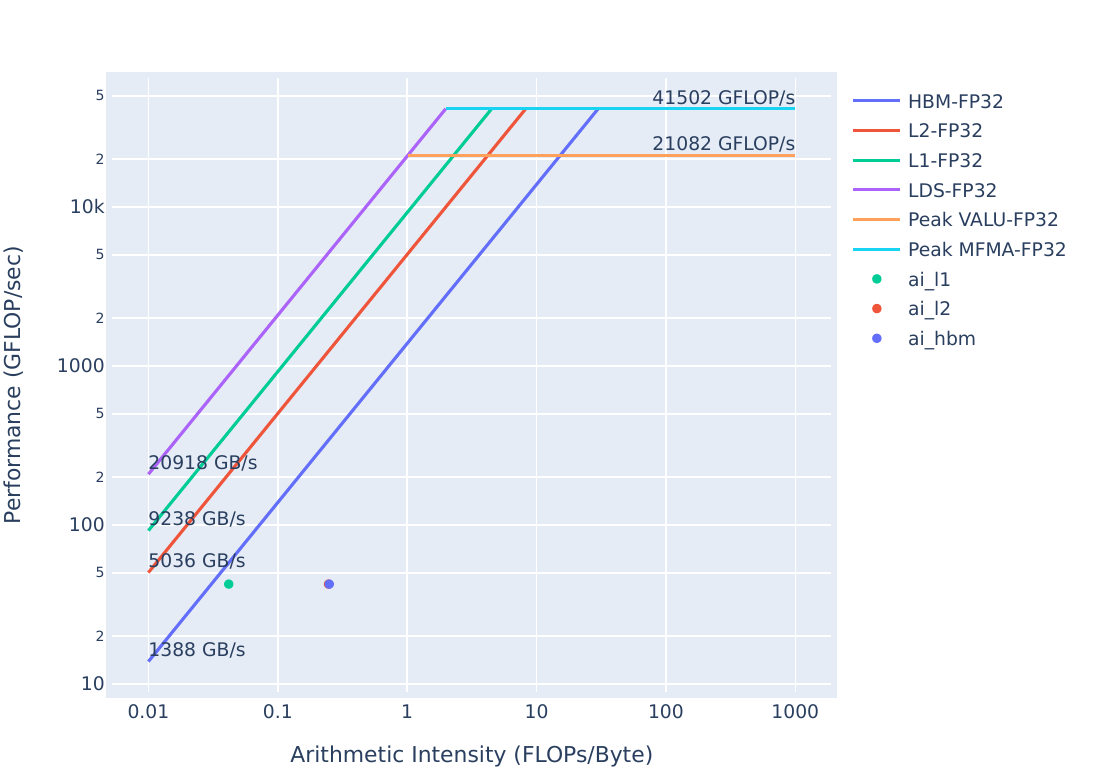 | |FP16/INT8 ||
 |
We see that there is still room to move the solution roofline up towards the bandwidth limit.
| Roofline Type | Problem Roofline | Solution Roofline |
|---|---|---|
| FP32/FP64 | |
|
| FP16/INT8 | |
|
Again, we see that the solution’s optimizations have resulted in the kernel moving up in the roofline, meaning the solution executes more efficiently than the problem.
Using LDS can be very helpful in reducing global memory reads where you have repeated use of the same data. However, large LDS allocations can also negatively impact performance by limiting the amount of wavefronts that can be resident in the device at any given time. Be wary of LDS usage, and check the SPI stats to ensure your LDS usage is not negatively impacting occupancy.